Most teams know they need better AWS cost control, but the problem rarely starts with the budget itself. It starts with how signals are structured and when action happens. If your alerts come late or feel reactive, the system is already ineffective. A tiered threshold strategy fixes this by creating a sequence of awareness and control that works in real usage.
Keep reading if you want a practical way to set this up and make your budget alerts actually drive action.
What Is a Tiered Threshold Strategy?
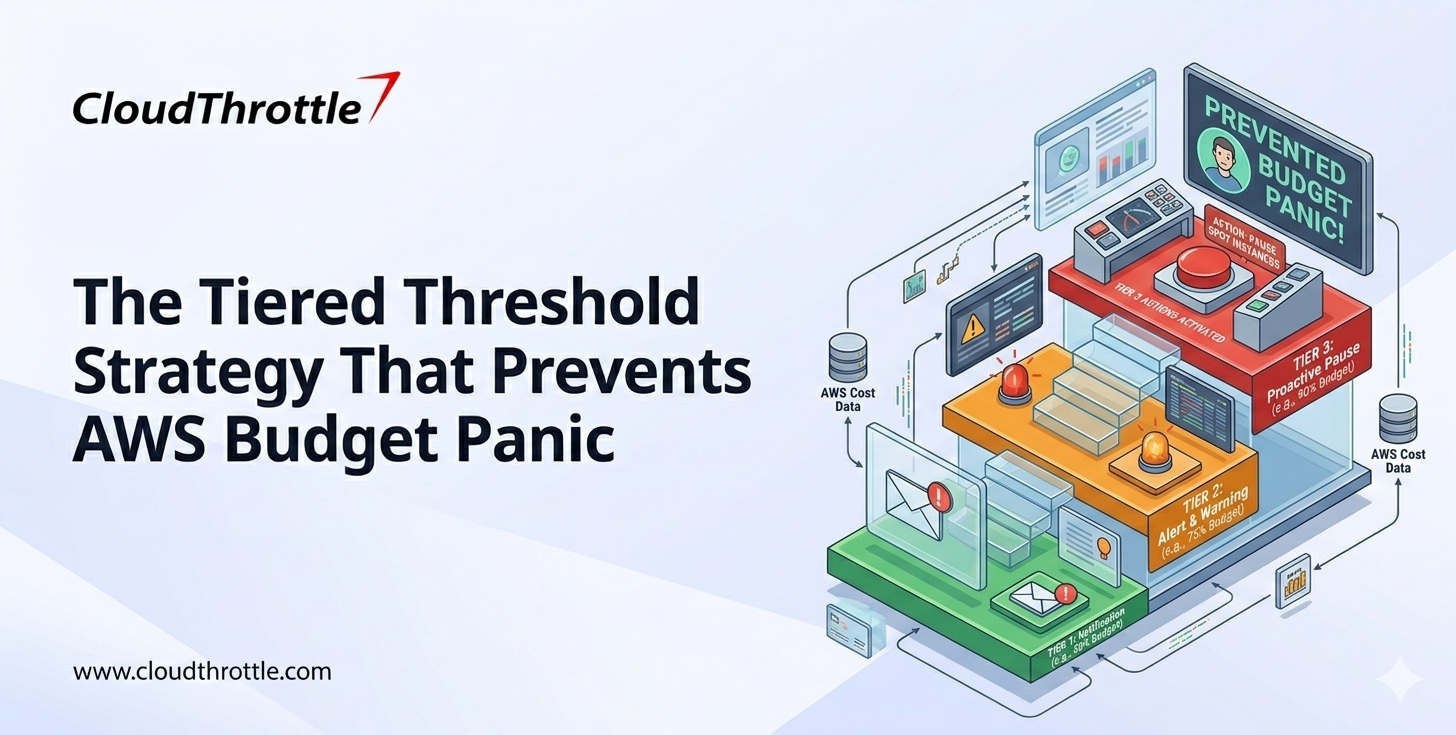
A tiered threshold strategy is a structured way of setting AWS budget alerts so that teams do not react at the last moment. It also supports stronger AWS cost management. Instead of relying on a single alert near the budget limit, it creates multiple checkpoints across the usage cycle.
Each threshold serves a purpose: the first builds awareness, the second drives review, and the final triggers action. This approach ensures that cost signals arrive early enough to influence decisions. It turns budget monitoring into a continuous process rather than a last-minute response.
Decoding a Tiered Threshold Strategy
Here is an overview of a tiered threshold strategy and how it works in practice:
Stage 1: Early Awareness Threshold
This is where AWS cost control begins. The goal is not to trigger action, but to ensure the budget owner is aware of how usage is evolving before it becomes significant. At this stage, nothing is urgent, but ignoring it creates blind spots that show up later.
- Set this at a lower percentage of the budget so it triggers early in the cycle
- Use it to validate expected usage patterns against planned workloads
- Check if any new services or experiments are contributing to cost
- Confirm that tagging and ownership mapping are working correctly
- Avoid taking action unless something clearly looks off
This stage builds context. It tells you whether things are on track. Without it, later alerts feel sudden and disconnected.
Stage 2: Active Review Threshold
This is where attention becomes necessary. Usage has reached a level where it needs to be understood in detail. This is the stage where most cost issues can still be corrected without impacting production workloads.
- Identify which services or teams are driving the increase
- Compare current usage with historical patterns to spot deviations
- Review recent deployments or configuration changes
- Check for inefficiencies such as idle resources or over-provisioning
- Decide if optimization is required now or can be scheduled
This stage is where control starts forming. It gives you time to act with clarity. If this stage is skipped, the system moves straight into pressure.
Stage 3: Controlled Action Threshold
This is the final checkpoint before the budget limit is reached, and it plays a critical role in AWS cost control. Action is required at this stage, but it should not feel chaotic. The earlier stages have already created awareness and insight, so decisions are based on understanding rather than urgency.
- Reduce or scale down non-critical workloads that can be deferred
- Optimize high-cost resources that are driving the majority of spend
- Pause experiments or lower-priority environments if needed
- Validate that essential workloads remain unaffected
- Ensure the budget stays within limits without disrupting core operations
This stage is about execution. It should feel deliberate. If the earlier thresholds are working, this becomes a controlled response rather than a last-minute reaction.
Implementation Guide for Tiered AWS Budget Thresholds
Most teams understand the idea of tiered thresholds. The challenge is turning that idea into a system that works under real usage. Implementation is not about adding more alerts, but about building a sequence that guides behavior over time.
- Start With One Budget Scope at a Time
Do not try to apply this across everything at once. Pick one product or one environment. This keeps the setup manageable and makes it easier to validate what works.
- Choose a budget that has clear ownership
- Ensure spend is already visible and traceable
- Avoid starting with shared or unclear scopes
This creates a controlled starting point.
- Define Three Clear Threshold Levels
The structure should be simple. Three levels are enough to create a progression without adding noise.
- Early threshold for awareness
- Mid threshold for review
- Final threshold for action
Each level should feel different in intent. Avoid setting thresholds too close to each other.
- Assign Ownership Before Configuring Alerts
Do not configure alerts first. Define ownership first to strengthen AWS cost management. Every threshold must map to a specific person who is responsible for responding, not a team or a group.
- Identify the primary owner for the budget
- Ensure the owner understands their responsibility
- Make ownership visible across teams
Without this step, alerts will not lead to action.
- Configure Alerts Using AWS Budgets
Once structure and ownership are clear, configure alerts.
- Set threshold percentages based on expected usage
- Map each alert to the budget owner
- Avoid sending alerts to shared distribution lists
The tool itself is simple, but the impact comes from how it is set up.
- Define Actions for Each Threshold Stage
Every alert should have a clear response. Without defined actions, alerts create confusion instead of control.
- Early stage focuses on validation
- Mid stage focuses on analysis
- Final stage focuses on execution
This ensures consistency in how teams respond.
- Integrate Alerts Into Existing Workflows
Alerts should not live in isolation. They need to be part of how teams already work.
- Route alerts to tools teams actively monitor
- Connect alerts with incident or review processes
- Ensure visibility during daily operations
This increases the chances of timely response.
- Validate With a Full Budget Cycle
Do not judge the system immediately. Run the setup across a full billing cycle to understand how thresholds behave.
- Track when alerts are triggered
- Check if owners are responding as expected
- Identify gaps in timing or clarity
This step helps refine the system based on real usage.
- Refine Thresholds Using Real Data
Initial thresholds are assumptions, and AWS cost control improves as real usage reveals what needs adjustment.
- Adjust percentages based on observed patterns
- Remove unnecessary alerts
- Improve clarity where confusion exists
This keeps the system relevant over time.
- Scale Across Budgets Gradually
Once the model works for one budget, expand it carefully.
- Apply the same structure to similar workloads
- Maintain consistency in ownership and thresholds
- Avoid rushing into full-scale implementation
Scaling without structure leads to the same problems you started with.
- Keep Ownership and Strategy Visible
The system should not operate in the background.
- Make ownership clear across teams
- Share how thresholds are structured
- Reinforce expectations regularly
Visibility ensures that the system continues to drive behavior.
A tiered threshold strategy only works when structure and action are aligned. It moves cost management from delayed reaction to continuous control when implemented correctly.
Common Mistakes in Tiered Threshold Setup
Even with multiple thresholds, systems fail when structure is weak. The most common issues include:
- Setting thresholds too close to each other
- Sending all alerts with the same priority
- Not defining actions for each level
- Routing alerts to shared groups instead of individuals
Multiple alerts become noise instead of guidance without clear differentiation.
Best Practices for Tiered AWS Budget Thresholds
Here are the best practices for setting up tiered AWS budget thresholds:
- Set Thresholds Based on Usage Behavior: Do not rely on percentages blindly. Align thresholds with how your workloads actually consume resources so alerts feel relevant.
- Differentiate Alert Intent Clearly: Each threshold should have a distinct purpose. Early alerts create awareness, mid alerts drive review, final alerts demand action.
- Map Each Threshold to a Specific Owner: Alerts should go to individuals who are responsible for that budget. Ownership ensures alerts lead to decisions.
- Define Expected Actions for Every Stage: Each alert should answer one question. What should the owner do now? This removes hesitation during response.
- Avoid Alert Fatigue Through Smart Spacing: Keep enough gap between thresholds so alerts do not feel repetitive. Too many similar alerts reduce attention.
- Align Thresholds With Billing Cycles: Structure thresholds around monthly or project-based cycles so spend tracking remains meaningful.
- Use Historical Data to Refine Thresholds: Review past usage patterns to adjust thresholds over time. This improves accuracy and relevance.
- Ensure Tagging Consistency Before Setting Thresholds: Thresholds lose context without proper cost allocation as ownership depends on accurate tagging.
- Integrate Alerts With Real Workflows: Alerts should reach tools teams actively use. This improves response speed and visibility.
- Review Threshold Performance Regularly: Check whether alerts are leading to action. If not, adjust thresholds or ownership structure accordingly.
Practical Takeaway: How to Set Tiered Thresholds
If you are implementing this strategy, focus on structure.
- Start by defining three clear levels.
- Ensure each level has a purpose. Avoid overlap between thresholds.
- Map each alert to a specific owner.
- Define what action is expected at each stage.
- Review thresholds regularly based on usage patterns.
- Also, remember that the effectiveness of this approach depends on clarity and not complexity.
Conclusion
AWS budget alerts are only as effective as the system behind them. A single alert creates pressure. A tiered system creates control. The difference comes down to timing.
When teams receive the right signals at the right stages, they act early and avoid panic. This is what strong cloud budget monitoring looks like in practice. The issue is not the budget if your current setup reacts late. It is the threshold strategy. Move from a single alert to a structured sequence. That shift alone can turn cost management from reactive to controlled.
If your setup reacts late, the problem is not the budget but the threshold strategy. Moving to a structured sequence and using platforms like CloudThrottle to manage thresholds, ownership, and multi-account visibility helps turn cost management from reactive to controlled.
Note: Information reflects publicly available sources at the time of publication and may change